
My Role
Lead Designer
Researcher
Team
EY Stakeholders
Project Manager
Development Lead
Content Writer
Executive Summary (TL;DR)
The Context: Major clients like Ernst & Young (EY) faced a significant bottleneck. Their global financial teams (often split between offshore units and central offices) struggled to collaborate because the application lacked built-in translation.
The Goal: Implement a seamless, in-app translation feature to eliminate manual external workflows.
The Impact: The final solution cut review time in half (50%) by allowing users to toggle instantly between languages, directly securing Caseware’s competitive advantage in the global market.
Project Context
This project originated from direct customer feedback, specifically from Ernst & Young (EY), one of Caseware's major clients. They highlighted a significant bottleneck: their global teams, often involving offshore or outsourced units working in different languages, struggled with collaboration because the financial reporting application lacked built-in translation.
Problem
Without language support, the core problem was inefficiency and inconsistency. Teams were manually copying text into external tools for translation, which was not only slow and error-prone but also raised potential confidentiality concerns. This significantly hampered collaboration on critical financial documents.
How might we significantly improve user efficiency and collaboration for global accounting firms, securing Caseware's competitive advantage?
User Goal
To implement a seamless, built-in translation feature that eliminates manual translations, thereby resolving inconsistencies and delays in financial report generation.
Business Goal
To accelerate Caseware cloud adoption and market penetration.
Discovery
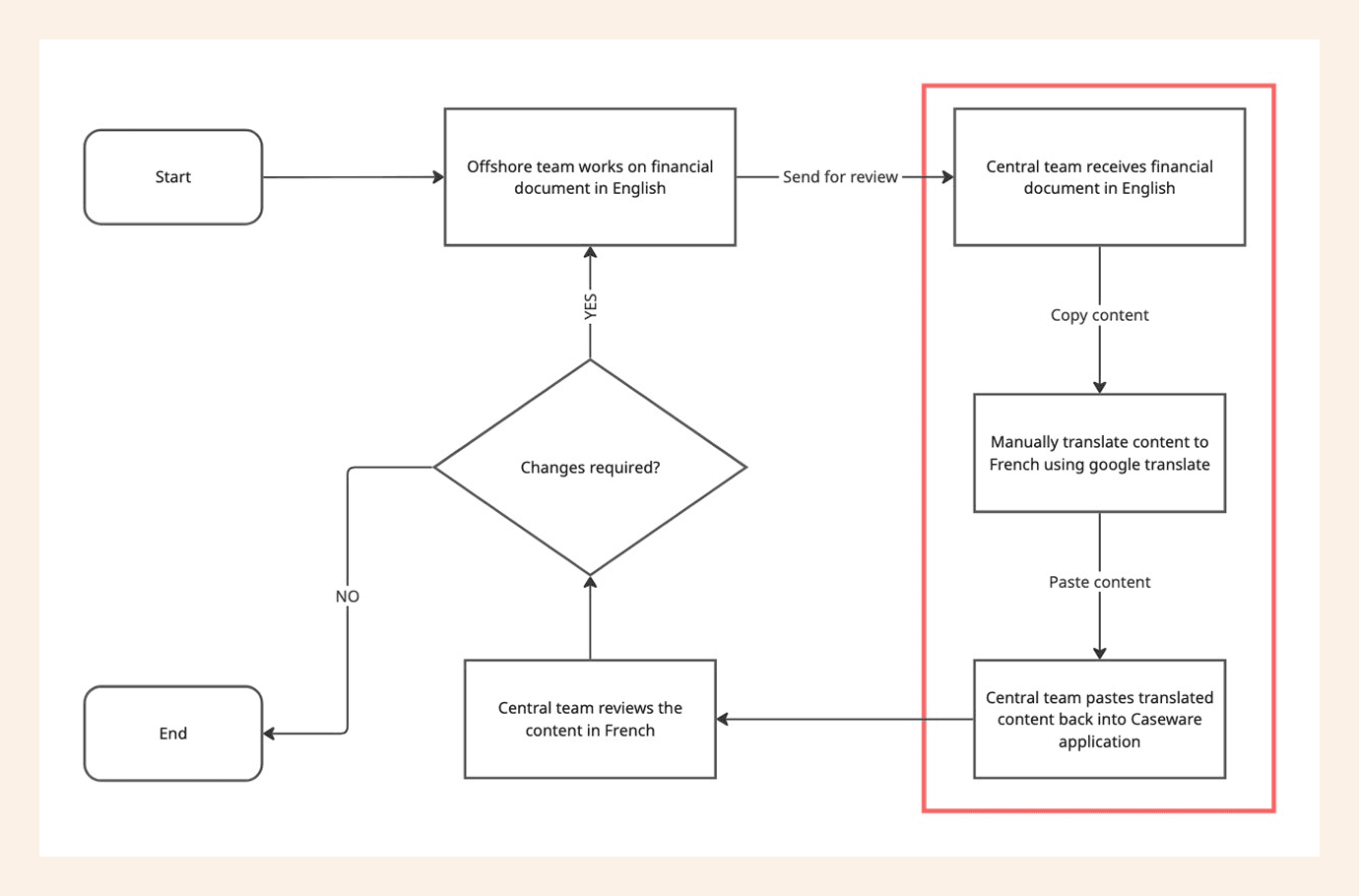
Previous Workflow
Here is a quick overview to show how the teams with different local languages worked with Caseware's financial document prior to implementing this feature.
Pain points prior to implementing this feature
Competitive Analysis
As an initial research, I began to read up on translation feature being used in our daily applications like Google translate, Amazon, Wikipedia, Shein etc.
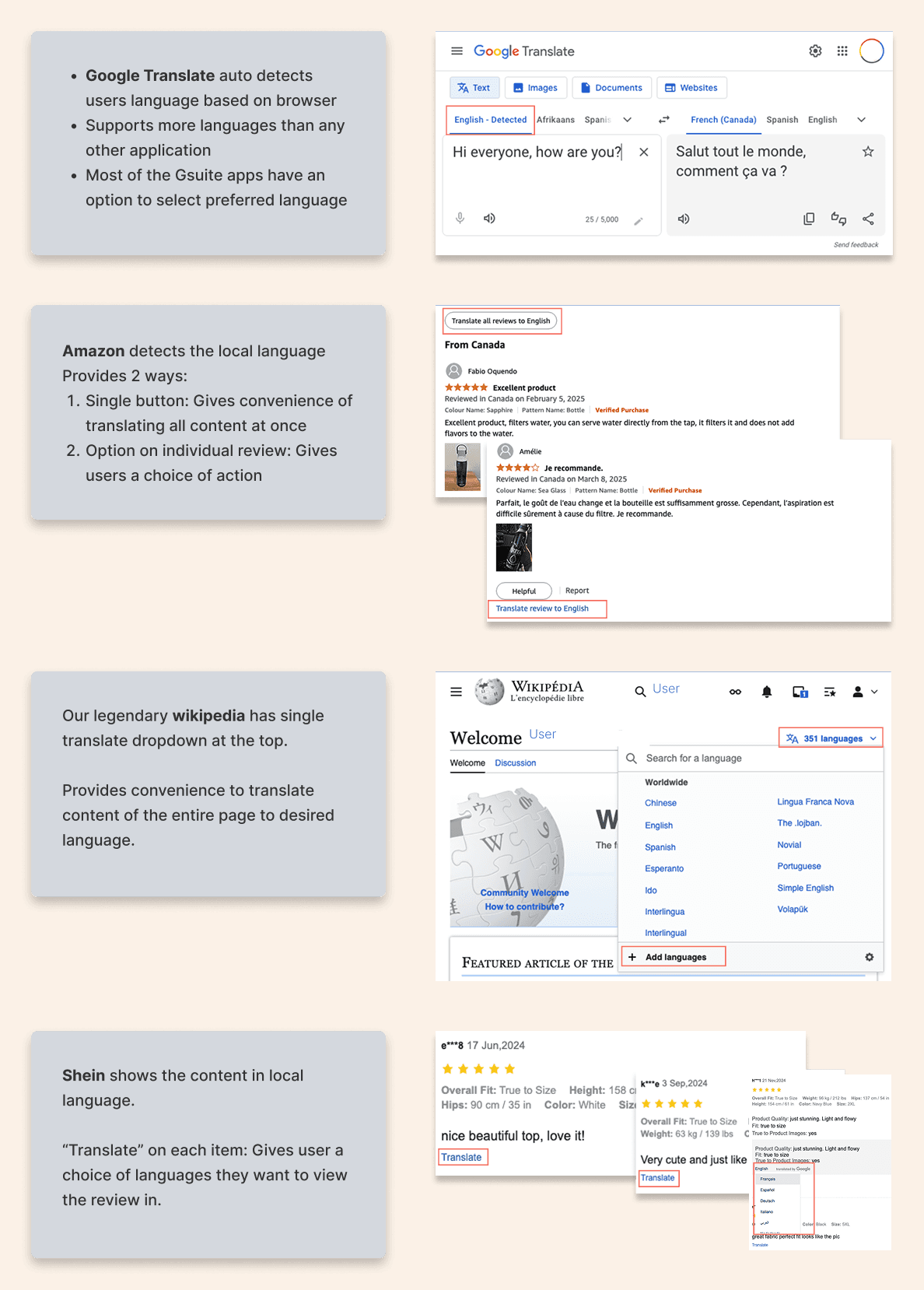
Competitive Analysis
What did I learn?
Competitive analysis across popular daily applications (like Google Translate, Amazon, Wikipedia, and Shein) confirmed that integrated translation utility is no longer a differentiating luxury, but a mandatory feature baseline required in all applications. Translating whole document or part of is contextual to the application and its users.
User Journey Map
I initiated discussions with key stakeholders through customer journey mapping session to assess the impact of this feature on our platform.
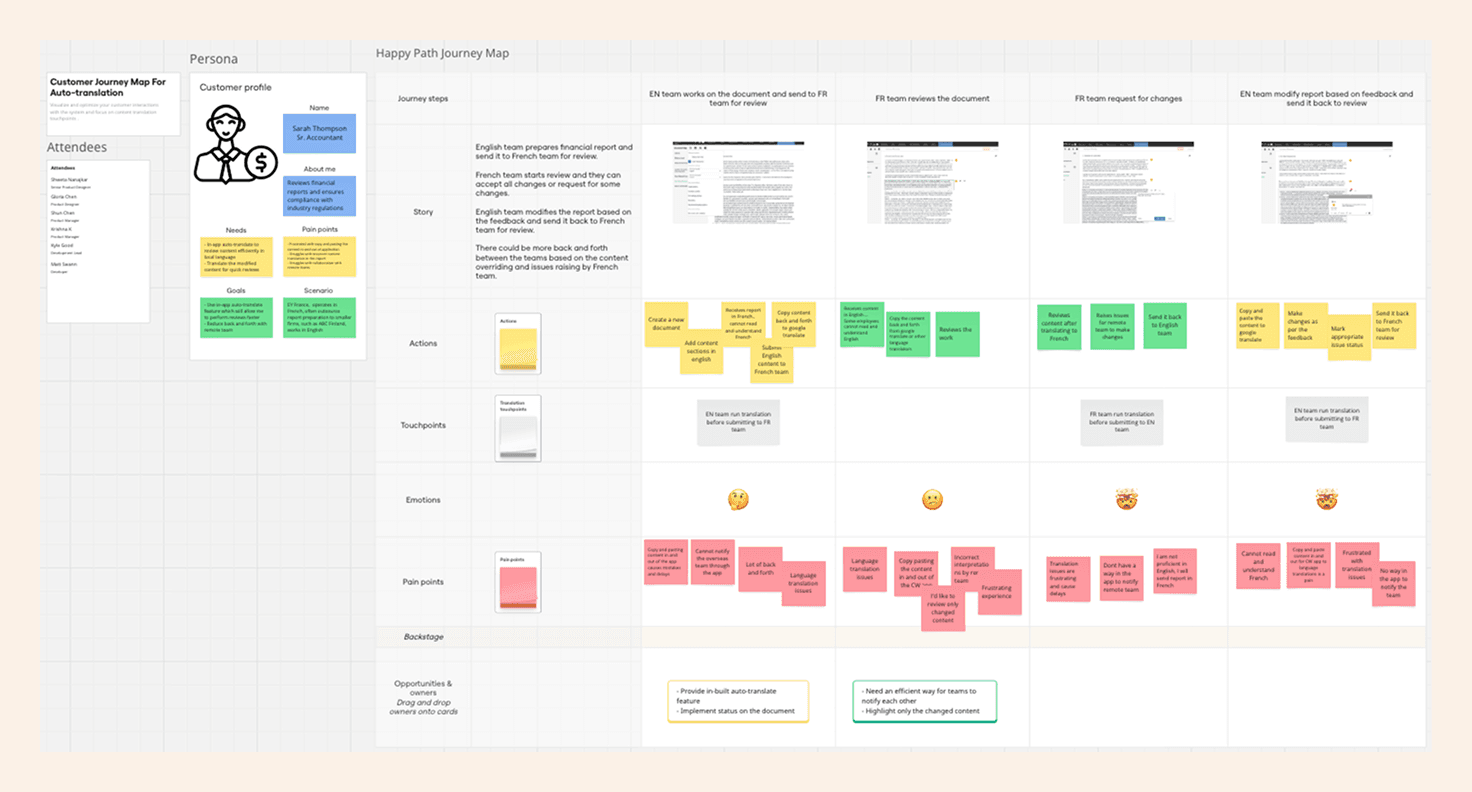
User journey mapping session with stakeholders
What did I learn?
User journey mapping revealed that financial reporting complexities require more than a simple translation toggle. More critically, our success depends on implementing a user-controlled approach, allowing users to run translation on demand. So, our solution must be strategically aligned with the intended user workflow and the application's architectural constraints.
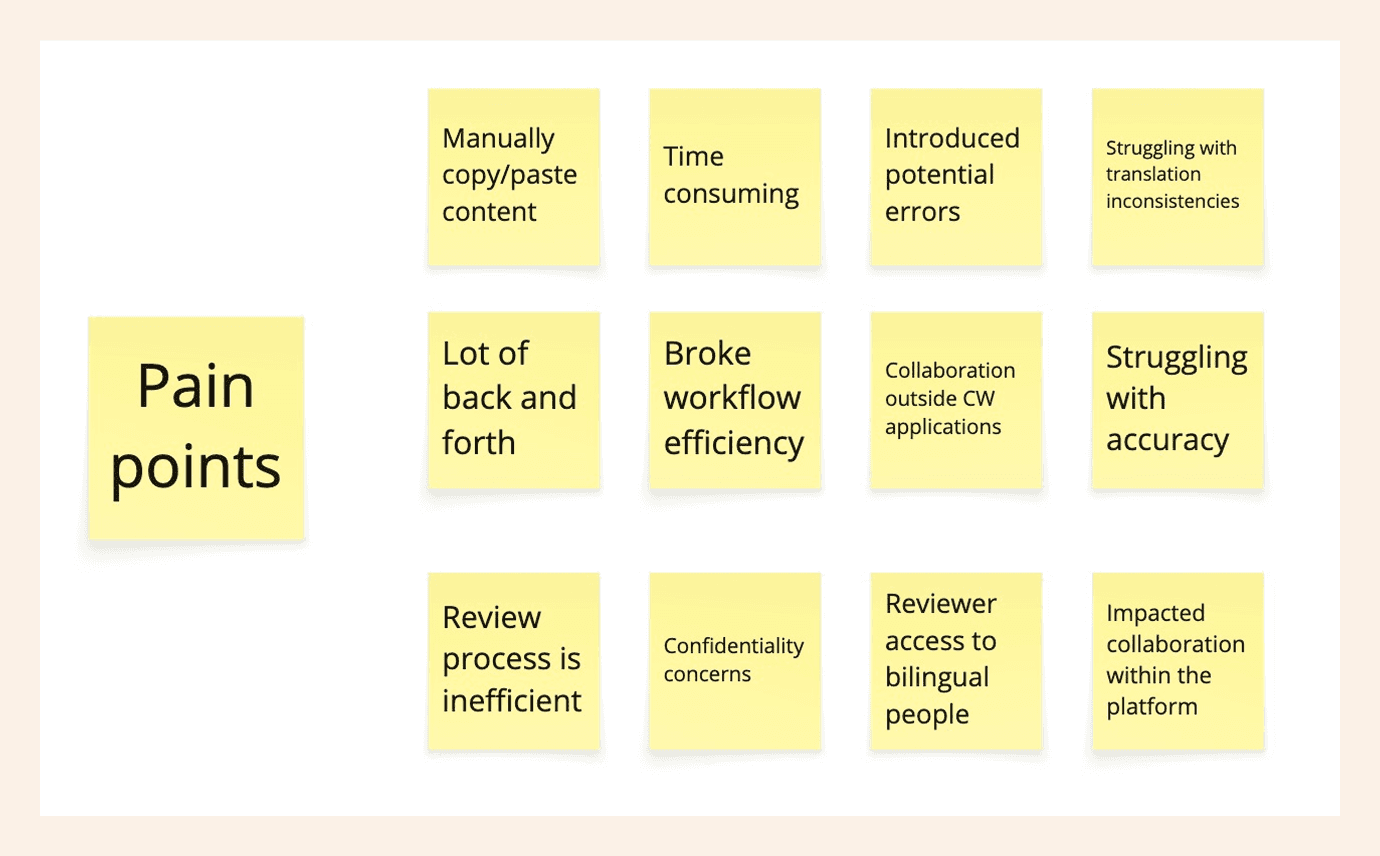
A closeup of pain points from the journey mapping session
Proposed Workflow
Synthesizing the insights and pain points captured during the journey mapping and user feedback sessions, I developed a User Flow Diagram. This was critical to visualize the user's optimal path through the interface, serving as the foundational blueprint for all subsequent discussions.
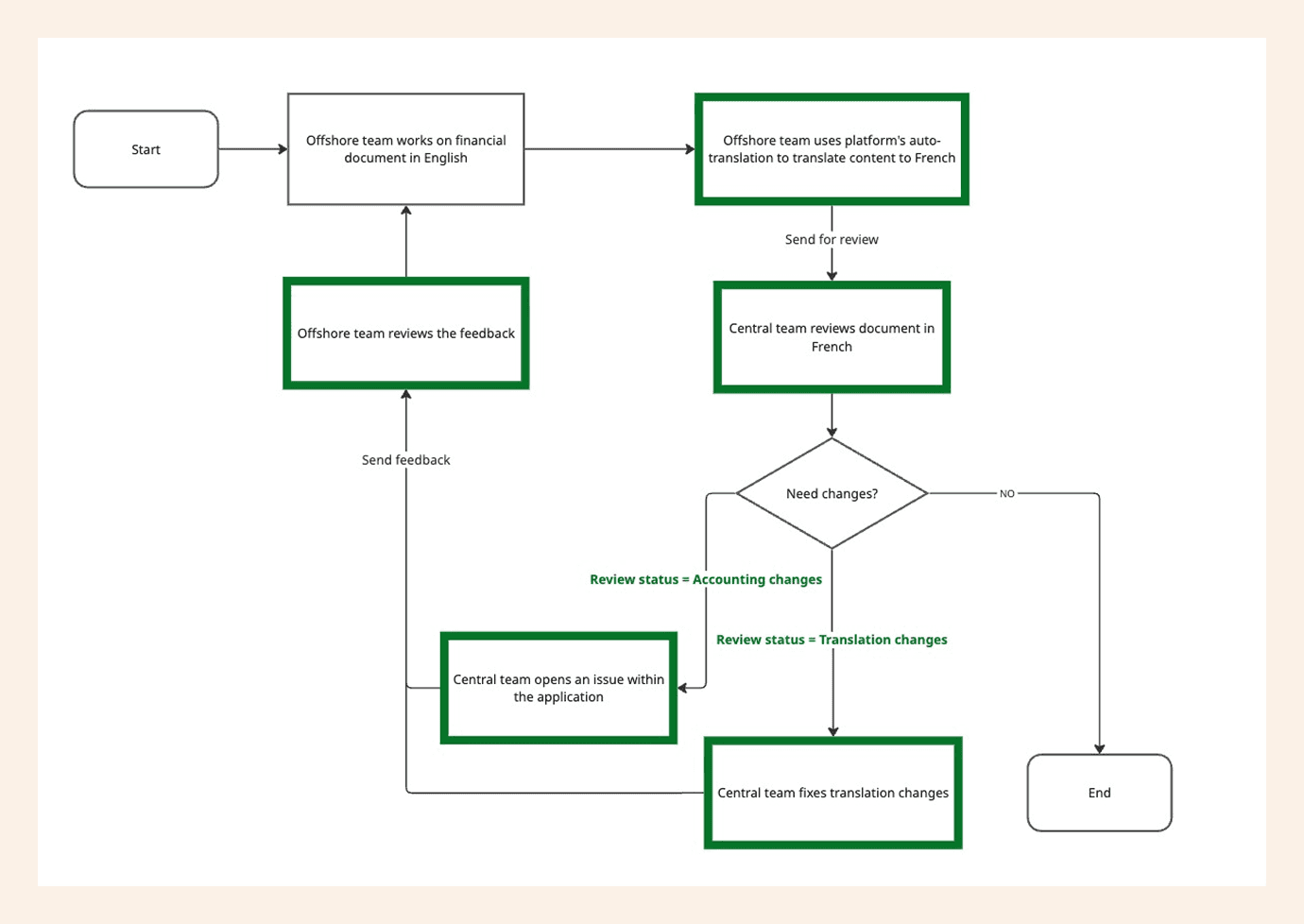
User flow diagram for potential solution
Ideation
Drawing upon our comprehensive research, I initiated Ideation to translate strategic findings into practical design. This stage involved developing the initial versions of the interface while continuously integrating customer feedback.
Scenario
Offshore Team (Works in English) | Central Team (Works in French) |
|---|---|
|
|
Challenges
Scope of the translation feature
Our initial implementation revealed a significant design flaw rooted. To activate translation for a single financial document, users were forced to perform an action with a much larger impact of toggling the language for the entire project. This forced global action was confusing, frustrating, and created user doubts.
BEFORE | AFTER |
|---|---|
 |  |
Having translation within the application is game changing for us but why am I changing language of entire engagement while working only on financial document? | Now, I see a translation option under financial document settings, this is where I'd go when I begin working on it. There's even options to select different working and reporting languages. |
Accelerating Financial Review and Analysis - The core user motivation
For our users, the translation feature was not a novelty. It was an expected tool to eliminate the friction of language barriers.
Challenge was to accelerate their review process by instantly interpreting foreign language documents without having to interrupt their flow to manually copy, paste, or switch applications. We were solving for speed, accuracy, and uninterrupted focus in the critical path of document review.
BEFORE | AFTER |
|---|---|
 |  |
Highlighting the content changed by running translation is great but as a reviewer these status markers are confusing to me. I'd also want to fix inaccurately translated content to save time. Oh, and what if someone changes the content while I'm reviewing? | Having simplified status markers on changed content definitely makes it easier. The "Next change" button helps us to navigate through the changes faster. The overall status of the document will make collaboration so much easier! |
Empowering user control - On Demand Translation
Users demanded greater control and flexibility over the translation function to prevent language inaccuracy. The challenge was to shift from rigid, automatic runs to a user-initiated, on-demand action that only consumes system resources when the user strategically decides the translation is required.
BEFORE | AFTER |
|---|---|
 |  |
Running translation on the same content multiple times generates inaccurate outputs that is time consuming and often leads to delays in submitting final document. | Now, I have an option to enable or disable the translation runs on the content which will save a lot time and avoid unnecessary multiple translation runs on the same content. |
Enabling seamless validation and review
To maximize review efficiency, users required the ability to rapidly compare the translation against the source document. This was another core requirement to enhance review efficiency. Challenge was to provide a low-effort mechanism to instantly toggle between the original and translated document views to minimize the time spent on manually navigating and cross-referencing for document sign-off.
BEFORE | AFTER |
|---|---|
 |  |
For faster review, I'd like to switch the content between original and translated versions to ensure language correctness. | Now I can switch between languages for the translated sections. This cuts my review time in half. |
Final Designs
Offshore team working on a new financial document
Central team reviewing the financial document
Looking Ahead
We focused on a mix of unique and common pain points to design an experience that significantly enhances the financial reporting application within our product suite, But we’ve only scratched the surface.
Several enhancements could further elevate this capability:
Granular Change Tracking: Implementing a solution to display only the modified text, rather than entire sections, would further enhance the review process.
Version Control: Integrating version control would enable users to track edits, including who made changes, when, and what was modified.
AI-Powered Translation Suggestions: Leveraging AI to suggest translations for complex financial terms could improve accuracy and consistency across reports.
Conclusion
With the market-trends and Caseware's focus on cloud adoption, it was critical to get this capability into our product early. Keeping user-centric approach and effective communication with cross functional teams I could successfully deliver a solution to improve efficiency and collaboration for global accounting firms.
Personally, this project reinforced a foundational belief: Great design is not about removing inherent complexity—it's about expertly guiding people through it. Even in the demanding environment of enterprise accounting software, design must always prioritize the people AND it will create great business impact.


Let's connect
I'm not just here to design products; I'm here to connect with people.
As a product designer, I'm on an exciting journey to blend creativity with technology to craft memorable user experiences.